Skip to content
CyberOpsSec
CyberOpsSec

Just another cybersecurity site

  • Home
  • Posts
  • Knowledge
    • Auditing
    • Linux Commands
    • Ports & Protocols
    • Scanning
    • Sniffing
    • Syslog
    • Vulnerability/Patch Mgmt
  • About
  • Contact
CyberOpsSec

Just another cybersecurity site

Disable mDNS

Admin, March 13, 2024August 11, 2025

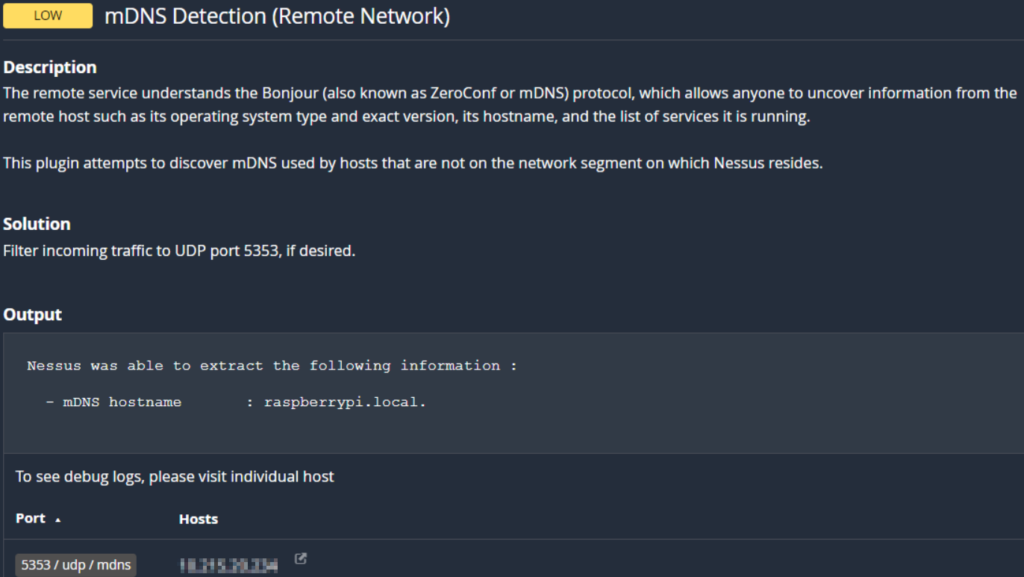
Issuing netstat and lsof commands to view UDP 5353 connections/listening ports shows that the avahi-daemon and chromium browser are actively listening.

netstat -anop | grep 5353
lsof -i UDP

To fix avahi, you would disable the service from running with “sudo systemctl disable avahi-daemon”
To fix Chromium, you could create/modify the shortcut to “chromium-browser %U –disable-features=MediaRouter”

After disabling the service and changing chromium to disable “MediaRouter” we now get this, which is much cleaner and mitigates the vulnerability:

Vulnerabilities

Post navigation

Previous post
Next post

Related Posts

Nessus False Positive

June 25, 2024August 11, 2025

Plugin ID: 132101Windows Speculative Execution Configuration Check According to MS: KB4072698: Windows Server and Azure…

Read More

AD CS Vulnerabilities

January 11, 2024August 11, 2025

If an attacker gets domain user level permissions they could use tools such as certipy-ad…

Read More

Blocking Responder

November 21, 2023August 11, 2025

Responder is usually one of the first things a pentester will fire up after plugging…

Read More

Recent Posts

  • Patch Mgmt – Windows Update Issues
  • MSSQL Auditing
  • BloodHound CE Setup
  • UBI – User Browsing Isolation
  • Rolling KRBTGT Account

Recent Comments

No comments to show.

Archives

  • November 2025
  • August 2025
  • June 2025
  • November 2024
  • September 2024
  • June 2024
  • May 2024
  • March 2024
  • January 2024
  • November 2023
  • September 2023

Categories

  • Audit
  • EPP
  • Tools
  • Uncategorized
  • Vulnerabilities
©2025 CyberOpsSec | WordPress Theme by SuperbThemes